

Blog
2026-3-10
What is XB2 Button Switch?
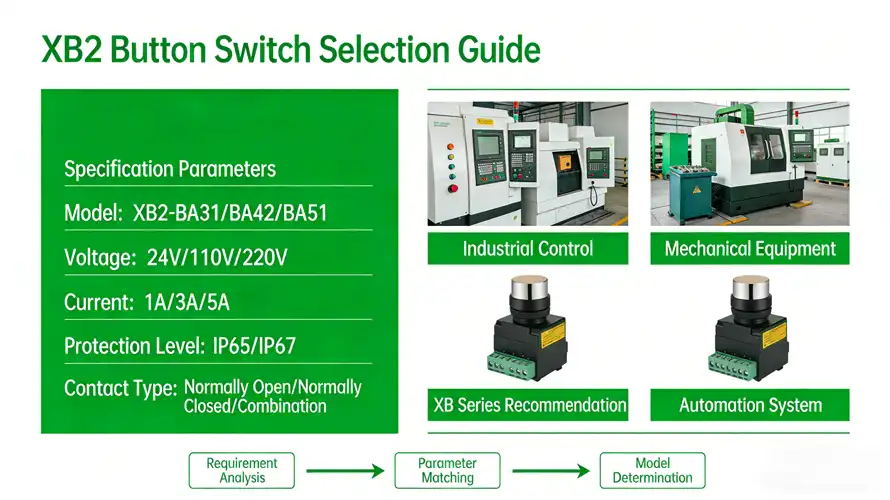
The LVMA XB2 series is a 22mm opening industrial button/indicator with a head + base + contact detachable design. The selection is completed in five steps: “Application→Type→Color→Contact→Voltage→Environment”. Model rules and commonly used models are attached. You can apply them directly.
1. Step 1: Define Core Parameters & Selection Path
Before diving into specific models, confirm these key points to streamline the process:
-
Mounting Diameter: The XB2 series features a standard 22mm mounting hole, compatible with most industrial control panels .
-
Modular Structure: The final part number is typically a combination of the “Operator Head” + “Contact Block” .
-
Key Performance: Standard buttons have a mechanical life of up to 3 million operations and offer an IP65 protection rating (IP66 for shrouded buttons). They operate in a wide temperature range of -25 to +70°C .
2. Step 2: Select the Operator Head by Function
First, choose the appropriate button or switch head based on your required operation and function.
| Type | Sub-type | Key Features | Selection Criteria & Common Part Number Examples |
|---|---|---|---|
| Pushbutton Head | Flush/Extended | Momentary or maintained action for Start/Stop functions. | Color indicates function (Green=Start, Red=Stop). Examples: ZB2BA3C (Green Flush), ZB2BA4C (Red Flush). |
| Illuminated | Integrated LED indicator for status visibility. | Requires an illuminated contact block. Voltage must be specified (e.g., 24V, 220V). Example: ZB2BW31C (Green Illuminated Flush). | |
| Mushroom Head | Protruding head for easy operation, commonly used for Emergency Stop. | Diameters available in 40mm, 60mm, etc. Example: ZB2BC2C (40mm Red). | |
| Emergency Stop | Meets safety standards. Reset by twist or pull. | Two main reset types: Twist-to-Release (e.g., ZB2BS54C) and Pull-to-Release (e.g., ZB2BT4C). | |
| Selector Switch Head | Standard Knob | 2 or 3 positions for mode selection. | Specify the number of positions required. Examples: ZB2BD2C (Black, 2-position), ZB2BD3C (Black, 3-position). |
| Key Switch | Requires key operation to prevent unauthorized use. | Offers higher security. Example: ZB2BG2C (2-position). |
3. Step 3: Select the Contact Block by Circuit Requirements
After choosing the operator, select the appropriate contact block(s) based on how many Normally Open (NO) and Normally Closed (NC) contacts your control circuit needs.
| Contact Block Type | Contact Configuration | Part Number Example | Application & Notes |
|---|---|---|---|
| Standard Contact Block | 1 N.O. | ZB2BZ101C | Simple start, jogging control. |
| 1 N.C. | ZB2BZ102C | Stop, Emergency Stop control. | |
| 1 N.O. + 1 N.C. | ZB2BZ105C | When both start and stop signals are needed from one operator. | |
| Illuminated Contact Block | 24V LED + 1 N.O. | ZB2BWB11C | For illuminated buttons. Must match the voltage and LED color of the operator head. |
| 220V LED + 1 N.C. | ZB2BWM32C | Same as above. | |
| Auxiliary Contact Block | 1 N.O. or 1 N.C. | ZB2BE101C (N.O.) / ZB2BE102C (N.C.) | Can be stacked onto a main contact block to add more contacts, up to 6 total. |
4. Configuration Examples & Selection Process Summary
Example: How to configure a “Green, Illuminated, Momentary, 1 N.O. + 1 N.C.” Start Button?
-
Select Operator Head: Green Illuminated Flush Pushbutton Head → ZB2BW31C
-
Select Main Contact Block: Illuminated contact block with 1 N.O. contact (required for illumination) → ZB2BWB11C
-
Select Auxiliary Contact Block: Need an additional 1 N.C. contact → ZB2BE102C
-
Final Assembly: ZB2BW31C + ZB2BWB11C + ZB2BE102C
Selection Process Summary:
-
Define Function: Standard button, illuminated button, E-stop, or selector switch?
-
Select Head: Choose operator head model based on function (color, positions, reset mode).
-
Match Contacts: Select contact block(s) based on circuit needs (NO/NC count, illuminated/voltage).
-
Expand Contacts: If more contacts are needed, add auxiliary contact blocks.
5. Key Details & Important Considerations
-
-
Voltage Matching: For illuminated products and pilot lights, you must verify the operating voltage (24V AC/DC, 110V, 220V, etc.). Selecting the wrong voltage can damage the component .
-
Contact Rating: Standard XB2 contacts have a rated operational current of 3A at 240V (AC-15 utilization category), suitable for most industrial control signal circuits .
-
Wiring Capacity: Terminals accept 1 x 0.5mm² to 2 x 1.5mm² or 1 x 2.5mm² wires .
-
Contact Us
Share This Article


What is XB2 Button Switch?
The LVMA XB2 series is a 22mm opening industrial button/indicator with a head + base + contact detachable design. The selection is completed in five steps: “Application→Type→Color→Contact→Voltage→Environment”. Model rules and commonly used models are attached. You can apply them directly.
1. Step 1: Define Core Parameters & Selection Path
Before diving into specific models, confirm these key points to streamline the process:
-
Mounting Diameter: The XB2 series features a standard 22mm mounting hole, compatible with most industrial control panels .
-
Modular Structure: The final part number is typically a combination of the “Operator Head” + “Contact Block” .
-
Key Performance: Standard buttons have a mechanical life of up to 3 million operations and offer an IP65 protection rating (IP66 for shrouded buttons). They operate in a wide temperature range of -25 to +70°C .
2. Step 2: Select the Operator Head by Function
First, choose the appropriate button or switch head based on your required operation and function.
| Type | Sub-type | Key Features | Selection Criteria & Common Part Number Examples |
|---|---|---|---|
| Pushbutton Head | Flush/Extended | Momentary or maintained action for Start/Stop functions. | Color indicates function (Green=Start, Red=Stop). Examples: ZB2BA3C (Green Flush), ZB2BA4C (Red Flush). |
| Illuminated | Integrated LED indicator for status visibility. | Requires an illuminated contact block. Voltage must be specified (e.g., 24V, 220V). Example: ZB2BW31C (Green Illuminated Flush). | |
| Mushroom Head | Protruding head for easy operation, commonly used for Emergency Stop. | Diameters available in 40mm, 60mm, etc. Example: ZB2BC2C (40mm Red). | |
| Emergency Stop | Meets safety standards. Reset by twist or pull. | Two main reset types: Twist-to-Release (e.g., ZB2BS54C) and Pull-to-Release (e.g., ZB2BT4C). | |
| Selector Switch Head | Standard Knob | 2 or 3 positions for mode selection. | Specify the number of positions required. Examples: ZB2BD2C (Black, 2-position), ZB2BD3C (Black, 3-position). |
| Key Switch | Requires key operation to prevent unauthorized use. | Offers higher security. Example: ZB2BG2C (2-position). |
3. Step 3: Select the Contact Block by Circuit Requirements
After choosing the operator, select the appropriate contact block(s) based on how many Normally Open (NO) and Normally Closed (NC) contacts your control circuit needs.
| Contact Block Type | Contact Configuration | Part Number Example | Application & Notes |
|---|---|---|---|
| Standard Contact Block | 1 N.O. | ZB2BZ101C | Simple start, jogging control. |
| 1 N.C. | ZB2BZ102C | Stop, Emergency Stop control. | |
| 1 N.O. + 1 N.C. | ZB2BZ105C | When both start and stop signals are needed from one operator. | |
| Illuminated Contact Block | 24V LED + 1 N.O. | ZB2BWB11C | For illuminated buttons. Must match the voltage and LED color of the operator head. |
| 220V LED + 1 N.C. | ZB2BWM32C | Same as above. | |
| Auxiliary Contact Block | 1 N.O. or 1 N.C. | ZB2BE101C (N.O.) / ZB2BE102C (N.C.) | Can be stacked onto a main contact block to add more contacts, up to 6 total. |
4. Configuration Examples & Selection Process Summary
Example: How to configure a “Green, Illuminated, Momentary, 1 N.O. + 1 N.C.” Start Button?
-
Select Operator Head: Green Illuminated Flush Pushbutton Head → ZB2BW31C
-
Select Main Contact Block: Illuminated contact block with 1 N.O. contact (required for illumination) → ZB2BWB11C
-
Select Auxiliary Contact Block: Need an additional 1 N.C. contact → ZB2BE102C
-
Final Assembly: ZB2BW31C + ZB2BWB11C + ZB2BE102C
Selection Process Summary:
-
Define Function: Standard button, illuminated button, E-stop, or selector switch?
-
Select Head: Choose operator head model based on function (color, positions, reset mode).
-
Match Contacts: Select contact block(s) based on circuit needs (NO/NC count, illuminated/voltage).
-
Expand Contacts: If more contacts are needed, add auxiliary contact blocks.
5. Key Details & Important Considerations
-
-
Voltage Matching: For illuminated products and pilot lights, you must verify the operating voltage (24V AC/DC, 110V, 220V, etc.). Selecting the wrong voltage can damage the component .
-
Contact Rating: Standard XB2 contacts have a rated operational current of 3A at 240V (AC-15 utilization category), suitable for most industrial control signal circuits .
-
Wiring Capacity: Terminals accept 1 x 0.5mm² to 2 x 1.5mm² or 1 x 2.5mm² wires .
-